

PragyanCTF
蛮无聊的,过来看看老外的 ctf,图寻孩子懒得翻了,看看其他题目
FORENSICS
Plumbing
第一次做 docker 容器取证(至少我是第一次对 docker 打包的 tar 进行解压
正常来说,docker 的 image.tar 的内部结构如下
image.tar
└── manifest.json
└── index.json
└── oci-layout
└── blobs/
    └── sha256/
        ├── aaaaaa...
        ├── bbbbbb...
        ├── cccccc...
其中各个文件的作用如下
-
oci-layout
{"imageLayoutVersion":"1.0.0"}作用只是声明这是 OCI 标准格式,没有别的意义 -
index.json
镜像入口索引,一个 tar 里可能包含多个 image manifest。index.json 负责将 tag(如 app)映射到具体的 manifest digest{"schemaVersion":2,"mediaType":"application/vnd.oci.image.index.v1+json","manifests":[{"mediaType":"application/vnd.oci.image.index.v1+json","digest":"sha256:b04464d224e09249c70ed0e60c31ecff9c913d4a7bc1c30dadcdcdd67a7117a5","size":856,"annotations":{"io.containerd.image.name":"docker.io/library/app:latest","org.opencontainers.image.ref.name":"latest"}}]}{"schemaVersion":2,"mediaType":"application/vnd.oci.image.index.v1+json","manifests":[{"mediaType":"application/vnd.oci.image.index.v1+json","digest":"sha256:b04464d224e09249c70ed0e60c31ecff9c913d4a7bc1c30dadcdcdd67a7117a5","size":856,"annotations":{"io.containerd.image.name":"docker.io/library/app:latest","org.opencontainers.image.ref.name":"latest"}}]} -
mainifest.json
,基本作用是定义镜像=Config+按顺序叠加这些 layer[{"Config":"blobs/sha256/b3f4caf17486575f3b37d7e701075fe537fe7c9473f38ce1d19d769ea393913d","RepoTags":["app:latest"],"Layers":["blobs/sha256/1733a4cd59540b3470ff7a90963bcdea5b543279dd6bdaf022d7883fdad221e5","blobs/sha256/9fd9e26f8f287696571eb98b5e10e91211abbc4dd5918c5a2f50d1b697191540","blobs/sha256/004f0aa18a079de0973edc8a53f2397b4fe498cc595e21fb32ab01c89eb00a70","blobs/sha256/7bceabe27cdff3949f8ad5eb4db394db5850a5fbc33e0371b4d621298ef7ccb1","blobs/sha256/99bb3690467c4da195f1d336a1032fd64639cda9a6e719816d049d680d761d38","blobs/sha256/dfdedb04feee56ffcdb294dc2a710e152bfa8a90c5534a00b03c59e8cc2af85d","blobs/sha256/cfb8fcdc3104009c23e8b7f0d27bdaf51734a58786bd651e53df1782f714b1f0","blobs/sha256/123c3d8705680f885b8ef1ddac4d82686850e8c8e57a7a81f8ff8e55f4b44ac4","blobs/sha256/aeeab7a6f9f61a642c7ccccd3585617279943e0e84964e76caeaea20dd8446fd","blobs/sha256/d577b2611579eace74917fd7c1421f8a8031695ef97eafc4c3df196144302e77","blobs/sha256/234d56f45b44816c8eadd9882decbe45dc5b1c7042b42b94cd5f04399943036f","blobs/sha256/faabb23a872c8e0a3beb0763e3f7bf567cd5a5cb8e07732b224a82913d85a617"]}] -
blobs/sha256/*
,小一点的文件是 config,一般就几 KB,是 JSON 格式,大一点的文件就是 layer,它们是 gzip 格式,这一堆文件都靠 hash 串起来,emm,具体参考上面的那个 manifest.json
针对本题,可以直接查看 config
cat blobs/sha256/b3f4caf17486575f3b37d7e701075fe537fe7c9473f38ce1d19d769ea393913d | grep ctf
#p_ctf{d0ck3r_l34k5_p1p3l1n35}
epstein files
常规 pdf 隐写方法都做过尝试,没有成功,直接看十六进制,发现存在单词 Hidden
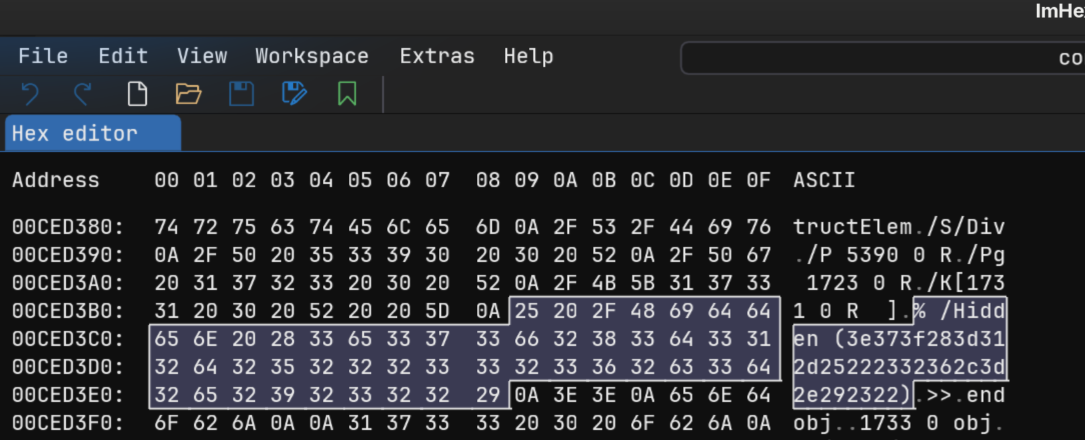
对十六进制解码,拿到了一串密文>7?(=1-%"#26,=.)#"
到这一步,可以猜测,原来的 pdf 也许隐藏着加密密文的 key,直接搜索即可,在 94 页可以找到
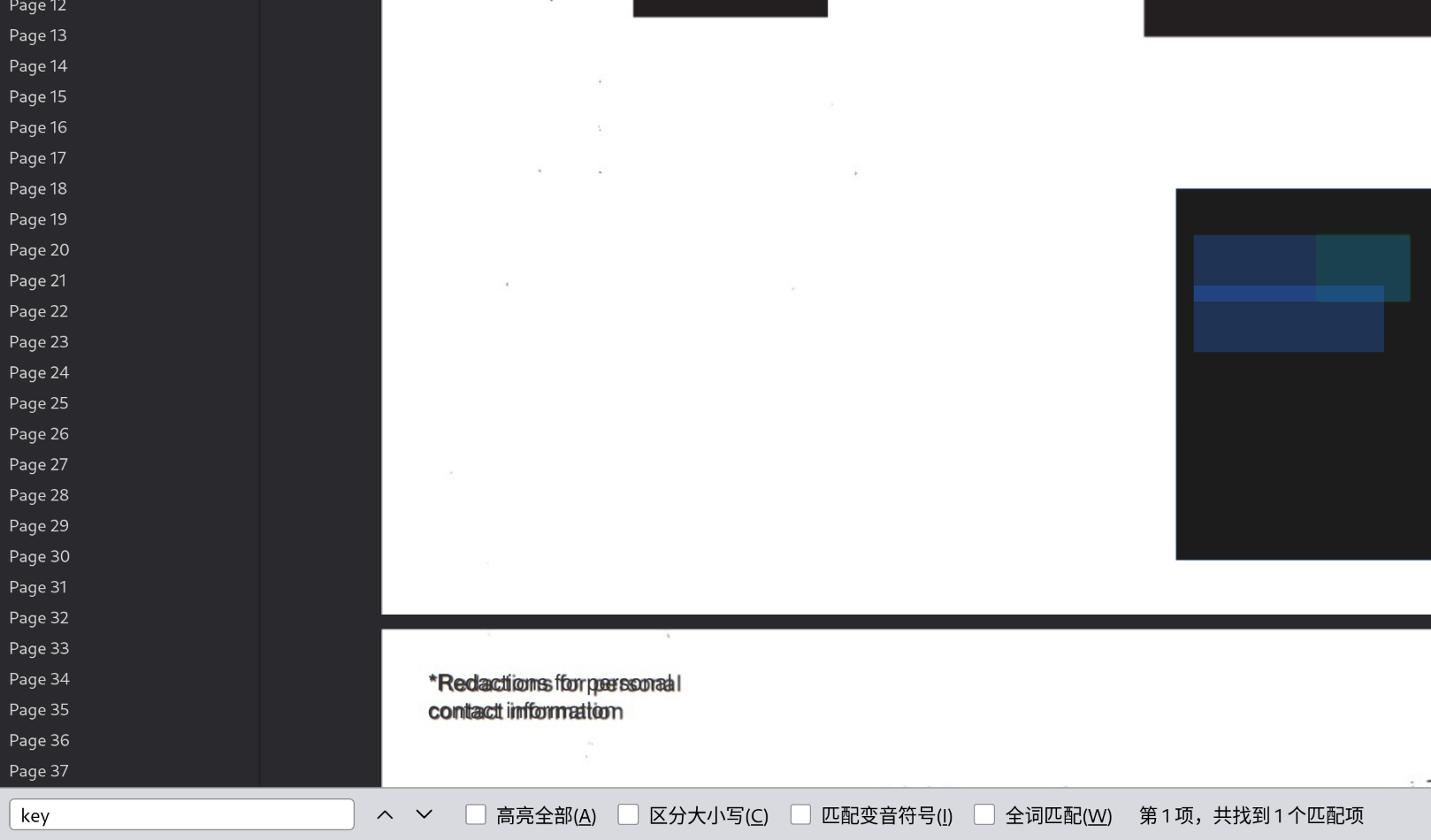
XOR_KEY
JEFFREY
xor 解密后,获取一段明文trynottogetdiddled,也许是某个压缩包的密码?
有进展了,正常的 pdf 文件,会以%%EOF结尾,但是在这个文件中,出现了其他东西
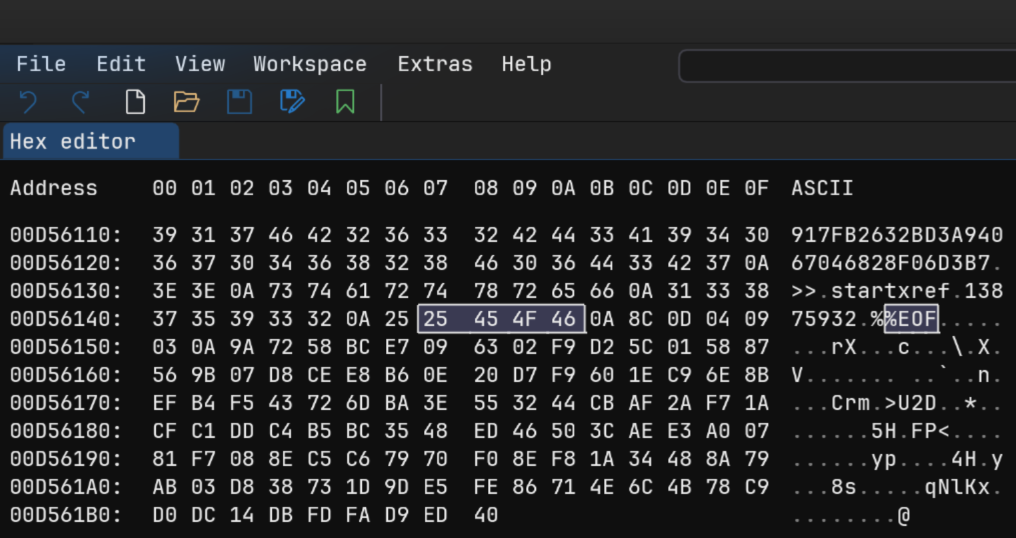
先提取出来,共 109 个字节
➜  下载 wc -c final.bin
109 final.bin
➜  下载 file final.bin
final.bin: PGP symmetric key encrypted data - AES with 256-bit key salted & iterated - SHA512 .
可以看到这是 PGP 对称密钥加密数据,使用上面的那个trynottogetdiddled可以成功解密
➜  下载 gpg --decrypt final.bin
gpg: AES256.CFB 已加密的数据
gpg: 以 1 个密码加密
cpgs{96a2_a5_j9l_u8_0h6p6q8}
接下来凑 flag 即可,flag 格式是 pctf{xxx},简单算算,c->p,shift=13;p->c,shift=13以此类推,进行 rot13 解密
pctf{96n2_n5_w9y_h8_0u6c6d8}但是提交错误,也许这里的数字需要变换?
rot 系列中,最常见的用于数字的分类是 rot5,旋转 5 位,比如说(9+5=14)%10=4
综上,本题最终需要进行 rot18 解密(rot13+rot5)
➜  下载 cat exp.py
def rot_18(text):
    result=""
    for char in text:
        if 'a' <=char <='z':
            result+=chr((ord(char)-ord('a')+13)%26+ord('a'))
        elif 'A' <= char <= 'Z':
            result+=chr((ord(char)-ord('A')+13)%26+ord('A'))
        elif '0'<=char<='9':
            result+=str((int(char)+5)%10)
        else:
            result+=char
    return result
print(rot_18("cpgs{96a2_a5_j9l_u8_0h6p6q8}"))
➜  下载 python exp.py
pctf{41n7_n0_w4y_h3_5u1c1d3}
$whoami
这种流量分析我做的不多,这次算是学到了
An internal investigation flagged an anomalous access event involving a restricted internal resource. The activity blends in with routine network traffic and appears to have relied on valid credentials, rather than exploiting a software flaw.

A packet capture was taken during the suspected time window.

Your task is to analyze the capture and determine:

The identity of the account responsible for the access

The credentials used during the incident

Only one account successfully reached the restricted resource.

flag format: p_ctf{username:password}
通过题目描述,我需要在多个用户中查找到唯一一个拥有访问受限资源的帐号以及对应密码
用 wireshark 大致浏览了下,发现登录主要通过 SMB 协议,那就单独提取下,发现重要信息
tshark -r capture.pcap -Y "smb2 or smb" 我截取部分
707   5.704040   10.1.54.28 → 10.1.54.102  SMB2 721 Session Setup Request, NTLMSSP_AUTH, User: \b.banner
  708   5.709945  10.1.54.102 → 10.1.54.28   SMB2 159 Session Setup Response
  709   5.712035   10.1.54.28 → 10.1.54.102  SMB2 166 Tree Connect Request, Tree: '\\10.1.54.102\IPC$'
  710   5.712269  10.1.54.102 → 10.1.54.28   SMB2 138 Tree Connect Response
---上面是b.banner用户成功登录,但是仅仅访问了IPC$共享路径---
975   7.818802   10.1.54.28 → 10.1.54.102  SMB2 715 Session Setup Request, NTLMSSP_AUTH, User: \groot
  976   7.824677  10.1.54.102 → 10.1.54.28   SMB2 159 Session Setup Response
  977   7.826473   10.1.54.28 → 10.1.54.102  SMB2 166 Tree Connect Request, Tree: '\\10.1.54.102\IPC$'
  978   7.826722  10.1.54.102 → 10.1.54.28   SMB2 138 Tree Connect Response
---上面是groot用户成功登录,但是仅仅访问了IPC$共享路径---
 1409  12.522101   10.1.54.28 → 10.1.54.102  SMB2 721 Session Setup Request, NTLMSSP_AUTH, User: \p.parker
 1412  12.528123  10.1.54.102 → 10.1.54.28   SMB2 159 Session Setup Response
 1413  12.532672   10.1.54.28 → 10.1.54.102  SMB2 166 Tree Connect Request, Tree: '\\10.1.54.102\IPC$'
 1414  12.532906  10.1.54.102 → 10.1.54.28   SMB2 138 Tree Connect Response
 1415  12.535897   10.1.54.28 → 10.1.54.102  SMB2 178 Ioctl Request FSCTL_QUERY_NETWORK_INTERFACE_INFO
 1416  12.535984  10.1.54.102 → 10.1.54.28   SMB2 322 Ioctl Response FSCTL_QUERY_NETWORK_INTERFACE_INFO
---上面是p.parker用户成功登录,但是仅仅访问了IPC$共享路径---
2479  20.785635   10.1.54.28 → 10.1.54.102  SMB2 719 Session Setup Request, NTLMSSP_AUTH, User: \hawkeye
 2480  20.786056  10.1.54.102 → 10.1.54.28   SMB2 131 Session Setup Response, Error: STATUS_LOGON_FAILURE
 2819  22.847054   10.1.2.123 → 10.1.3.255   BROWSER 247 Host Announcement DESKTOP-CE0P664, Workstation, Server, NT Workstation
 2820  22.847055   10.1.2.123 → 10.1.3.255   BROWSER 247 Host Announcement DESKTOP-CE0P664, Workstation, Server, NT Workstation
 3318  24.951061   10.1.54.28 → 10.1.54.102  SMB2 342 Negotiate Protocol Request
 3320  24.953022  10.1.54.102 → 10.1.54.28   SMB2 342 Negotiate Protocol Response
 3321  24.955810   10.1.54.28 → 10.1.54.102  SMB2 220 Session Setup Request, NTLMSSP_NEGOTIATE
 3322  24.956050  10.1.54.102 → 10.1.54.28   SMB2 429 Session Setup Response, Error: STATUS_MORE_PROCESSING_REQUIRED, NTLMSSP_CHALLENGE
 3323  24.957987   10.1.54.28 → 10.1.54.102  SMB2 719 Session Setup Request, NTLMSSP_AUTH, User: \hawkeye
 3328  24.963846  10.1.54.102 → 10.1.54.28   SMB2 159 Session Setup Response
 3329  24.965892   10.1.54.28 → 10.1.54.102  SMB2 166 Tree Connect Request, Tree: '\\10.1.54.102\IPC$'
 3330  24.966125  10.1.54.102 → 10.1.54.28   SMB2 138 Tree Connect Response
 3331  24.967584   10.1.54.28 → 10.1.54.102  SMB2 178 Ioctl Request FSCTL_QUERY_NETWORK_INTERFACE_INFO
 3332  24.967671  10.1.54.102 → 10.1.54.28   SMB2 322 Ioctl Response FSCTL_QUERY_NETWORK_INTERFACE_INFO
---上面是hawkeye用户登录失败一次成功一次,但是仅仅访问了IPC$共享路径---
3764  27.079266   10.1.54.28 → 10.1.54.102  SMB2 719 Session Setup Request, NTLMSSP_AUTH, User: \t.stark
 3766  27.085096  10.1.54.102 → 10.1.54.28   SMB2 159 Session Setup Response
 3767  27.086960   10.1.54.28 → 10.1.54.102  SMB2 166 Tree Connect Request, Tree: '\\10.1.54.102\IPC$'
 3768  27.087171  10.1.54.102 → 10.1.54.28   SMB2 138 Tree Connect Response
 3769  27.088577   10.1.54.28 → 10.1.54.102  SMB2 230 Ioctl Request FSCTL_DFS_GET_REFERRALS, Path: \10.1.54.102\SecretPlans
 3770  27.088655  10.1.54.102 → 10.1.54.28   SMB2 131 Ioctl Response, Error: STATUS_NOT_FOUND
 3771  27.089033   10.1.54.28 → 10.1.54.102  SMB2 178 Ioctl Request FSCTL_QUERY_NETWORK_INTERFACE_INFO
 3772  27.089096  10.1.54.102 → 10.1.54.28   SMB2 322 Ioctl Response FSCTL_QUERY_NETWORK_INTERFACE_INFO
 3774  27.091435   10.1.54.28 → 10.1.54.102  SMB2 180 Tree Connect Request, Tree: '\\10.1.54.102\SecretPlans'
 3775  27.091887  10.1.54.102 → 10.1.54.28   SMB2 138 Tree Connect Response
 4228  29.718066   10.1.54.28 → 10.1.54.102  SMB2 126 Tree Disconnect Request, Tree: '\\10.1.54.102\IPC$'
 4229  29.718073   10.1.54.28 → 10.1.54.102  SMB2 126 Tree Disconnect Request, Tree: '\\10.1.54.102\SecretPlans'
 4230  29.718185  10.1.54.102 → 10.1.54.28   SMB2 126 Tree Disconnect Response, Tree: '\\10.1.54.102\IPC$'
 4231  29.718271  10.1.54.102 → 10.1.54.28   SMB2 126 Tree Disconnect Response, Tree: '\\10.1.54.102\SecretPlans'
 --- 最后这个t.stark特别关键,是所有用户中唯一访问到SecretPlans的用户---
第一部分的答案已锁定,就是 t.stark,接下来需要抓取 ntlm 登录哈希信息
NTLMv2 哈希格式
username::domain:ServerChallenge:NTProofStr:ModifiedResponseBlob| 字段 | 位置 | 提取方法 |
|---|---|---|
| 用户名 | Security Blob → User Name | 直接复制字符串值 |
| 域名 | Security Blob → Domain | 直接复制字符串值(若为空则填.) |
| 服务器挑战 | Security Blob → NTLMv2 Challenge | 作为 16 字节十六进制字符串复制(例如df723e959c430a53) |
| NTProofStr | Security Blob → NTProofStr | 作为 32 字节十六进制字符串复制(例如f2958e36eb0d00d5...) |
| 响应 Blob | Security Blob → Response Blob | 复制完整二进制流(后续需截取后半段) |
在 wireshark 中直接追踪这个 3764 包,能清楚看到各个部分
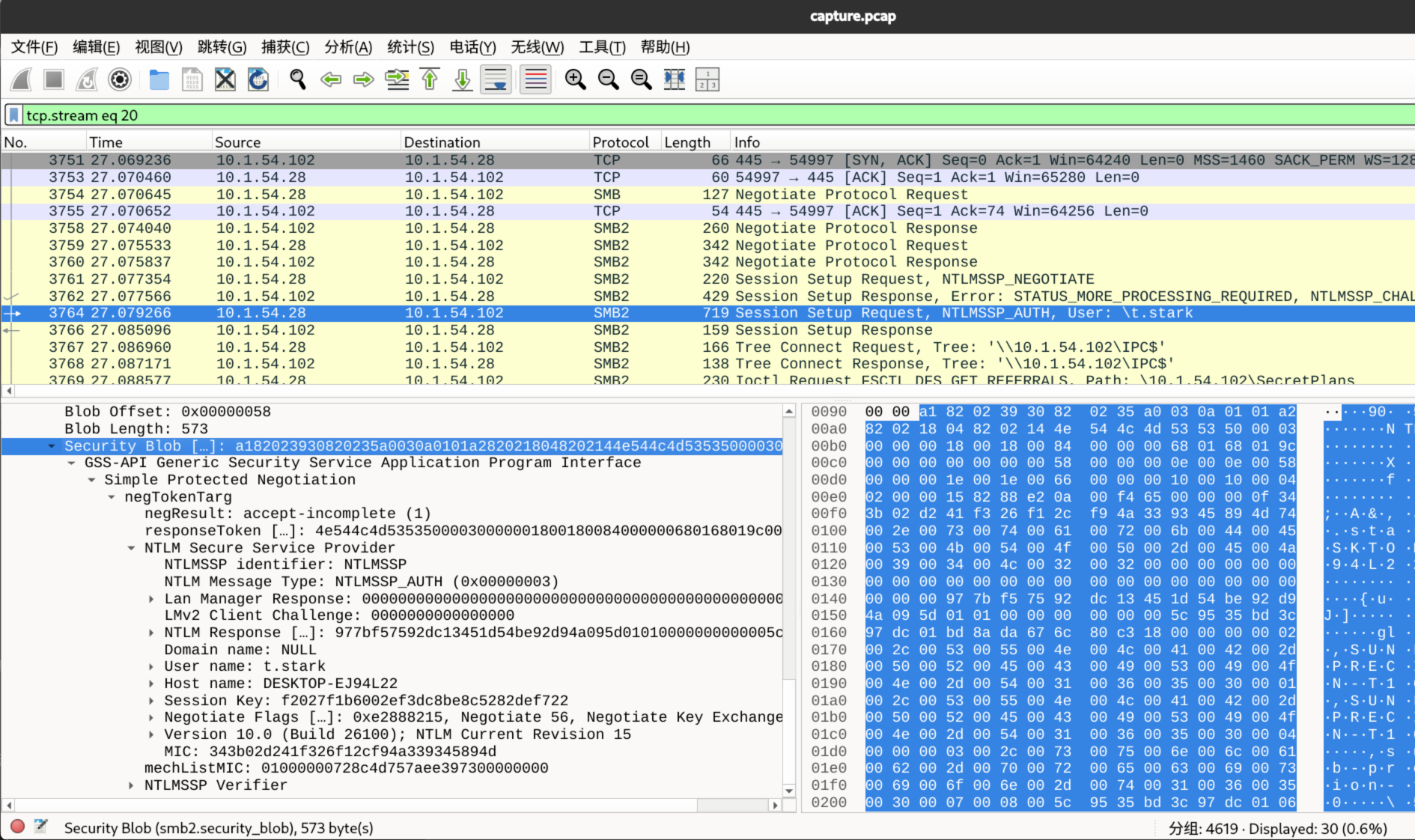
- username=t.stark
- domain=NULL
- ServerChallenge=e3ec06e38823c231
- 这里需要查看上一个包(3762)
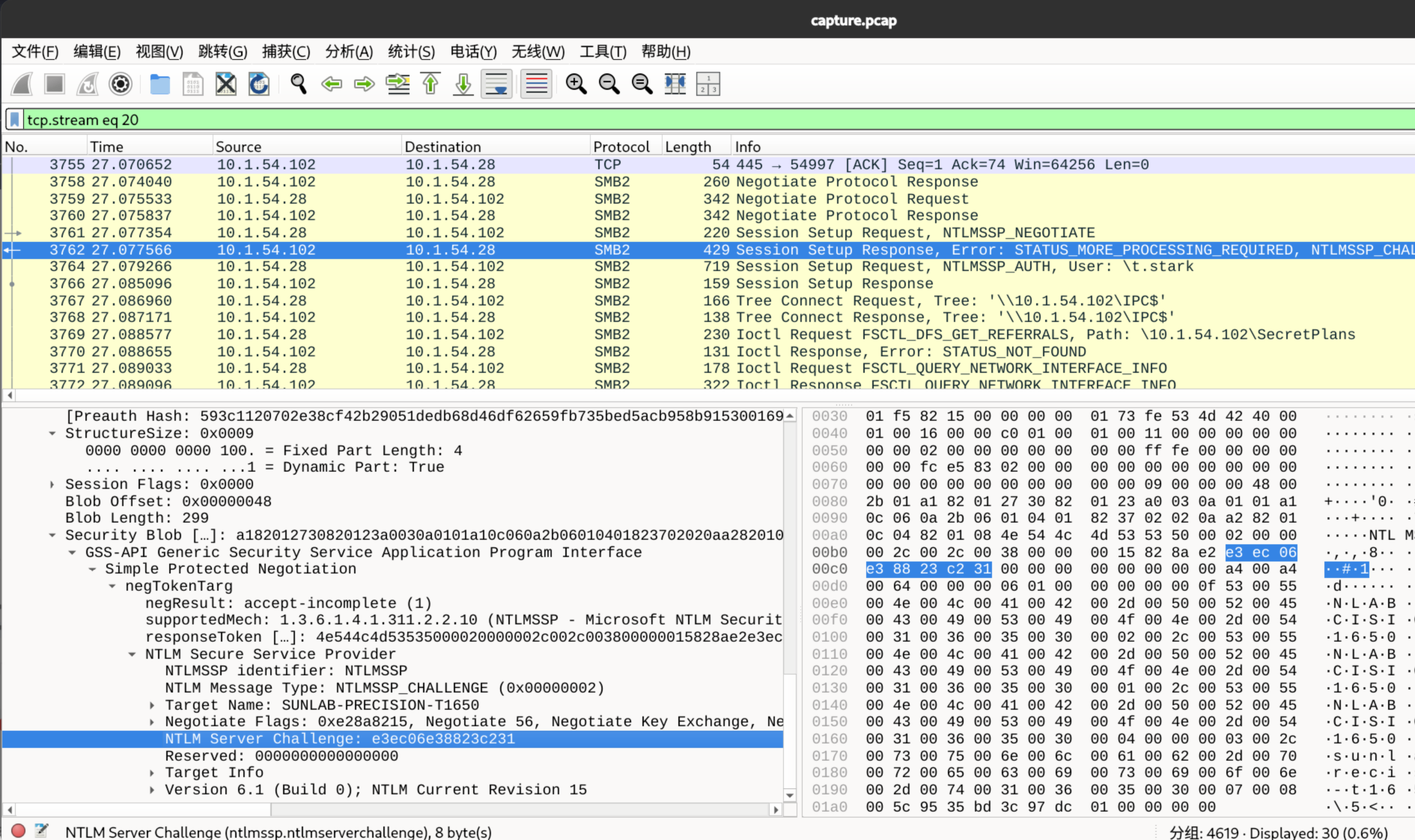
- 这里需要查看上一个包(3762)
- NTProofStr=977bf57592dc13451d54be92d94a095d
- 回到 3764 包里面,查看 NTLMv2 Response 下面
-
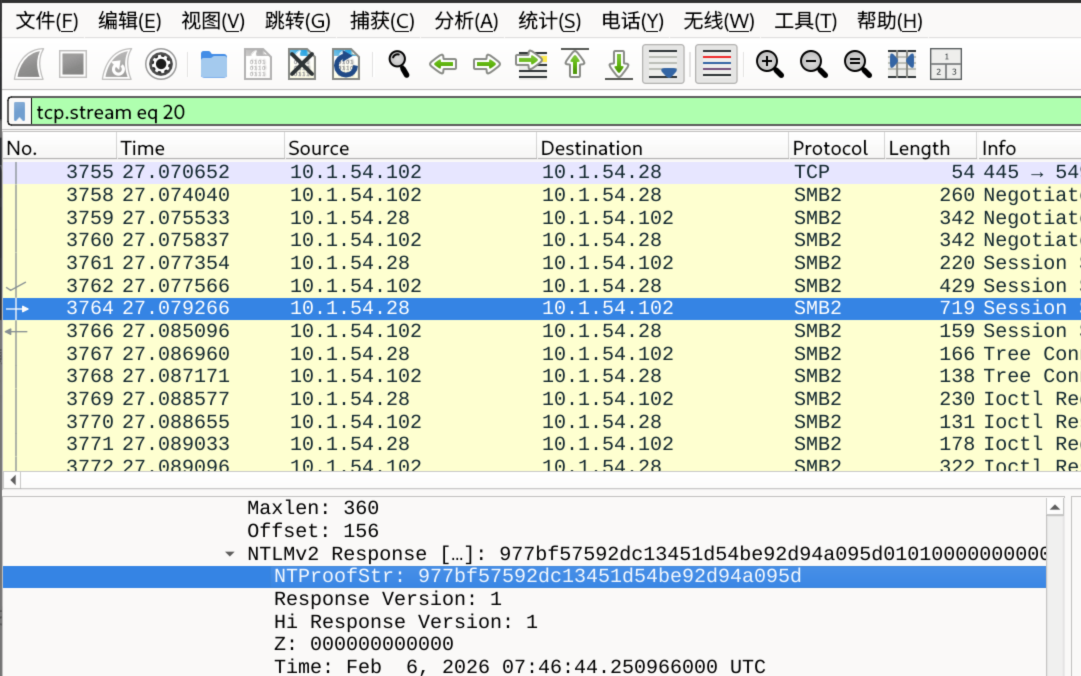
- ModifiedResponseBlob=01010000000<省略很多>03100312000000000000000000
- 上面的 NTLMv2 Response 的所有值中,删减掉那个 TUProofStr 即可
综上,用户 t.stark 对应的 NTLMv2 哈希应该是
t.stark::NULL:e3ec06e38823c231:977bf57592dc13451d54be92d94a095d:01010000000000005c9535bd3c97dc01bd8ada676c80c3180000000002002c00530055004e004c00410042002d0050005200450043004900530049004f004e002d005400310036003500300001002c00530055004e004c00410042002d0050005200450043004900530049004f004e002d00540031003600350030000400000003002c00730075006e006c00610062002d0070007200650063006900730069006f006e002d0074003100360035003000070008005c9535bd3c97dc01060004000200000008005000500000000000000000000000003000005057d986966e3d7d60e8bd92deb9e761f8ce9fa4941212bdba96c1840385d47e8b7fdec0ec98e0038631cb9ce097e391536012e8cff9908f333c76f932a7e9930a001000000000000000000000000000000000000900200063006900660073002f00310030002e0031002e00350034002e003100300032000000000000000000当然,这里没有必要弄这么麻烦,可以使用大佬制作的提取工具,这是一个可行工具的链接
密钥爆破
正常来说,用 hashcat+rockyou 这样爆破会出吧
hashcat -m 5600 hash.txt /usr/share/wordlists/rockyou.txt --force但是我字典跑完都没有出来,追踪几个 http 流量,发现 hint
GET /policy.txt HTTP/1.1
User-Agent: Mozilla/5.0 (Windows NT; Windows NT 10.0; en-IN) WindowsPowerShell/5.1.26100.7462
Host: 10.1.54.102:8080
Connection: Keep-Alive


HTTP/1.0 200 OK
Server: SimpleHTTP/0.6 Python/3.8.10
Date: Fri, 06 Feb 2026 07:46:27 GMT
Content-type: text/plain
Content-Length: 77
Last-Modified: Sat, 31 Jan 2026 18:55:41 GMT

SECURITY POLICY: Passwords must be [ProjectName][TimestampOfCreation_Epoch].
这里的 policy.txt 说了,密码是由项目名称+时间戳转换形成的,那么我们接下来继续看流量,还是在 http 流量中,这里面有四个项目
GET /notion.so HTTP/1.1
User-Agent: Mozilla/5.0 (Windows NT; Windows NT 10.0; en-IN) WindowsPowerShell/5.1.26100.7462
Host: 10.1.54.102:8080
Connection: Keep-Alive


HTTP/1.0 200 OK
Server: SimpleHTTP/0.6 Python/3.8.10
Date: Fri, 06 Feb 2026 07:46:31 GMT
Content-type: application/octet-stream
Content-Length: 69
Last-Modified: Sat, 31 Jan 2026 18:59:44 GMT

Ongoing Projects:
SuperHeroCallcentre
Terrabound
OceanMining
Arcadia
然后关于时间戳,不能参照上面流量包的时间,那仅仅是访问时间,继续向下看,会发现 admin.log 日志文件
GET /admin_log.txt HTTP/1.1
User-Agent: Mozilla/5.0 (Windows NT; Windows NT 10.0; en-IN) WindowsPowerShell/5.1.26100.7462
Host: 10.1.54.102:8080
Connection: Keep-Alive


HTTP/1.0 200 OK
Server: SimpleHTTP/0.6 Python/3.8.10
Date: Fri, 06 Feb 2026 07:46:34 GMT
Content-type: text/plain
Content-Length: 4878
Last-Modified: Fri, 06 Feb 2026 06:20:01 GMT

SERVER LOG: Scheduled cron job executed successfully: logrotate.daily at Jan 31 2016, 15:02 UTC
SERVER LOG: Admin audit completed for filesystem permissions on /var/www at Jan 31 2016, 15:04 UTC
SERVER LOG: Maintenance window initiated by Admin: node-3 at Jan 31 2016, 15:06 UTC
SERVER LOG: Cache cleanup completed for redis instance redis-main at Jan 31 2016, 15:07 UTC
SERVER LOG: SSH key rotation verified for backup-user at Jan 31 2016, 15:09 UTC
SERVER LOG: Load balancer config reloaded by Admin at Jan 31 2016, 15:10 UTC
SERVER LOG: Temporary firewall rule applied for internal scan at Jan 31 2016, 15:12 UTC
SERVER LOG: System time synchronized with NTP server pool.ntp.org at Jan 31 2016, 15:13 UTC
SERVER LOG: Database integrity check passed for users.db at Jan 31 2016, 15:15 UTC
SERVER LOG: Admin cleared application cache for service auth-api at Jan 31 2016, 15:17 UTC

SERVER LOG: Disk health check completed on /dev/sda1 at Jan 31 2016, 15:18 UTC
SERVER LOG: Log archival started for January logs at Jan 31 2016, 15:20 UTC
SERVER LOG: Deprecated config warning acknowledged by Admin at Jan 31 2016, 15:22 UTC
SERVER LOG: Monitoring threshold updated for CPU usage at Jan 31 2016, 15:23 UTC
SERVER LOG: Admin reviewed failed login metrics at Jan 31 2016, 15:25 UTC
SERVER LOG: Backup snapshot initiated for vm-auth-01 at Jan 31 2016, 15:27 UTC
SERVER LOG: Backup snapshot completed for vm-auth-01 at Jan 31 2016, 15:28 UTC
SERVER LOG: TLS certificates validated for internal services at Jan 31 2016, 15:30 UTC
SERVER LOG: Admin acknowledged IDS alert as false positive at Jan 31 2016, 15:31 UTC
SERVER LOG: Session store flushed for inactive sessions at Jan 31 2016, 15:33 UTC

SERVER LOG: Maintenance window checkpoint reached at Jan 31 2016, 15:35 UTC
SERVER LOG: Admin updated role mappings for service accounts at Jan 31 2016, 15:36 UTC
SERVER LOG: API rate limits recalculated for gateway at Jan 31 2016, 15:38 UTC
SERVER LOG: Admin reviewed access logs for anomalies at Jan 31 2016, 15:39 UTC
SERVER LOG: Debug logging temporarily enabled for auth-module at Jan 31 2016, 15:41 UTC
SERVER LOG: Debug logging disabled for auth-module at Jan 31 2016, 15:43 UTC
SERVER LOG: Kernel parameter vm.swappiness updated at Jan 31 2016, 15:44 UTC
SERVER LOG: Admin confirmed service health across all nodes at Jan 31 2016, 15:46 UTC
SERVER LOG: Temporary files purged from /tmp at Jan 31 2016, 15:48 UTC
SERVER LOG: Configuration drift scan completed at Jan 31 2016, 15:49 UTC

SERVER LOG: Admin verified sudoers configuration checksum at Jan 31 2016, 15:51 UTC
SERVER LOG: Authentication backend failover tested successfully at Jan 31 2016, 15:52 UTC
SERVER LOG: Service auth-api restarted gracefully at Jan 31 2016, 15:54 UTC
SERVER LOG: Admin approved pending configuration changes at Jan 31 2016, 15:55 UTC
SERVER LOG: Password reset requests approved by Admin during maintenance window: Jan 31 2016, 16:10 UTC
SERVER LOG: Audit trail updated for privileged actions at Jan 31 2016, 15:56 UTC
SERVER LOG: Admin cleared expired API tokens at Jan 31 2016, 15:58 UTC
SERVER LOG: Metrics exporter restarted by Admin at Jan 31 2016, 16:00 UTC
SERVER LOG: Maintenance notes saved to internal wiki at Jan 31 2016, 16:01 UTC
SERVER LOG: Admin reviewed user provisioning backlog at Jan 31 2016, 16:03 UTC

SERVER LOG: File ownership normalized for /srv/apps at Jan 31 2016, 16:05 UTC
SERVER LOG: Admin validated LDAP sync status at Jan 31 2016, 16:06 UTC
SERVER LOG: Session timeout policy enforced at Jan 31 2016, 16:08 UTC
SERVER LOG: Admin confirmed no pending escalations at Jan 31 2016, 16:09 UTC
SERVER LOG: Maintenance window nearing completion at Jan 31 2016, 16:11 UTC
SERVER LOG: Admin removed temporary firewall rules at Jan 31 2016, 16:12 UTC
SERVER LOG: Log forwarding resumed to central SIEM at Jan 31 2016, 16:14 UTC
SERVER LOG: Admin verified checksum of deployed binaries at Jan 31 2016, 16:15 UTC
SERVER LOG: Service dependency graph refreshed at Jan 31 2016, 16:17 UTC
SERVER LOG: Admin acknowledged completion of maintenance tasks at Jan 31 2016, 16:18 UTC

SERVER LOG: Monitoring alerts re-enabled post maintenance at Jan 31 2016, 16:20 UTC
SERVER LOG: Admin archived maintenance logs for compliance at Jan 31 2016, 16:22 UTC
SERVER LOG: System returned to normal operation mode at Jan 31 2016, 16:23 UTC
SERVER LOG: Admin signed off maintenance window at Jan 31 2016, 16:25 UTC
SERVER LOG: Routine health probe executed successfully at Jan 31 2016, 16:27 UTC
SERVER LOG: Admin verified user authentication latency metrics at Jan 31 2016, 16:28 UTC
SERVER LOG: Background job queue drained successfully at Jan 31 2016, 16:30 UTC
SERVER LOG: Admin reviewed final audit summary at Jan 31 2016, 16:31 UTC
SERVER LOG: Compliance flags cleared for January cycle at Jan 31 2016, 16:33 UTC
SERVER LOG: End of log batch for Jan 31 2016 at Jan 31 2016, 16:35 UTC
可以清楚看到都是 2016 年 1 月 1 日的部分日志信息,至于详细秒数什么的,我们可以尝试爆破,这是脚本
import struct, hmac, hashlib
import datetime

def left_rotate(n, b):
    return ((n << b) | (n >> (32 - b))) & 0xffffffff

def md4(data):
    h0, h1, h2, h3 = 0x67452301, 0xefcdab89, 0x98badcfe, 0x10325476
    msg = bytearray(data)
    ml = len(data)
    msg.append(0x80)
    while len(msg) % 64 != 56:
        msg.append(0)
    msg += struct.pack('<Q', ml * 8)
    for i in range(0, len(msg), 64):
        X = list(struct.unpack('<16I', msg[i:i+64]))
        a, b, c, d = h0, h1, h2, h3
        FF = lambda a,b,c,d,k,s: left_rotate((a + ((b&c)|((~b)&d)) + X[k]) & 0xffffffff, s)
        a=FF(a,b,c,d,0,3); d=FF(d,a,b,c,1,7); c=FF(c,d,a,b,2,11); b=FF(b,c,d,a,3,19)
        a=FF(a,b,c,d,4,3); d=FF(d,a,b,c,5,7); c=FF(c,d,a,b,6,11); b=FF(b,c,d,a,7,19)
        a=FF(a,b,c,d,8,3); d=FF(d,a,b,c,9,7); c=FF(c,d,a,b,10,11); b=FF(b,c,d,a,11,19)
        a=FF(a,b,c,d,12,3); d=FF(d,a,b,c,13,7); c=FF(c,d,a,b,14,11); b=FF(b,c,d,a,15,19)
        GG = lambda a,b,c,d,k,s: left_rotate((a + ((b&c)|(b&d)|(c&d)) + X[k] + 0x5a827999) & 0xffffffff, s)
        a=GG(a,b,c,d,0,3); d=GG(d,a,b,c,4,5); c=GG(c,d,a,b,8,9); b=GG(b,c,d,a,12,13)
        a=GG(a,b,c,d,1,3); d=GG(d,a,b,c,5,5); c=GG(c,d,a,b,9,9); b=GG(b,c,d,a,13,13)
        a=GG(a,b,c,d,2,3); d=GG(d,a,b,c,6,5); c=GG(c,d,a,b,10,9); b=GG(b,c,d,a,14,13)
        a=GG(a,b,c,d,3,3); d=GG(d,a,b,c,7,5); c=GG(c,d,a,b,11,9); b=GG(b,c,d,a,15,13)
        HH = lambda a,b,c,d,k,s: left_rotate((a + (b^c^d) + X[k] + 0x6ed9eba1) & 0xffffffff, s)
        a=HH(a,b,c,d,0,3); d=HH(d,a,b,c,8,9); c=HH(c,d,a,b,4,11); b=HH(b,c,d,a,12,15)
        a=HH(a,b,c,d,2,3); d=HH(d,a,b,c,10,9); c=HH(c,d,a,b,6,11); b=HH(b,c,d,a,14,15)
        a=HH(a,b,c,d,1,3); d=HH(d,a,b,c,9,9); c=HH(c,d,a,b,5,11); b=HH(b,c,d,a,13,15)
        a=HH(a,b,c,d,3,3); d=HH(d,a,b,c,11,9); c=HH(c,d,a,b,7,11); b=HH(b,c,d,a,15,15)
        h0=(h0+a)&0xffffffff; h1=(h1+b)&0xffffffff; h2=(h2+c)&0xffffffff; h3=(h3+d)&0xffffffff
    return struct.pack('<4I', h0, h1, h2, h3)

# 1. 证据数据
full_hash = "t.stark::NULL:e3ec06e38823c231:977bf57592dc13451d54be92d94a095d:01010000000000005c9535bd3c97dc01bd8ada676c80c3180000000002002c00530055004e004c00410042002d0050005200450043004900530049004f004e002d005400310036003500300001002c00530055004e004c00410042002d0050005200450043004900530049004f004e002d00540031003600350030000400000003002c00730075006e006c00610062002d0070007200650063006900730069006f006e002d0074003100360035003000070008005c9535bd3c97dc01060004000200000008005000500000000000000000000000003000005057d986966e3d7d60e8bd92deb9e761f8ce9fa4941212bdba96c1840385d47e8b7fdec0ec98e0038631cb9ce097e391536012e8cff9908f333c76f932a7e9930a001000000000000000000000000000000000000900200063006900660073002f00310030002e0031002e00350034002e003100300032000000000000000000"

parts = full_hash.split(':')
user = parts[0].split('::')[0]
sc = bytes.fromhex(parts[3])
expected_proof = parts[4]
blob = bytes.fromhex(parts[5])

# 2. 待测试的项目名 (来自 notion.so)
projects = ['SuperHeroCallcentre', 'Terrabound', 'OceanMining', 'Arcadia']

# 3. 设定爆破日期:2016年1月1日
# 遍历这一天从 0 到 86399 秒
start_of_day = datetime.datetime(2016, 1, 1, 0, 0, 0, tzinfo=datetime.timezone.utc)
day_seconds = 86400

print(f"[*] Starting bruteforce for the entire day: 2016-01-01 UTC")
print(f"[*] User: {user} | Testing {len(projects)} projects")

for second in range(day_seconds):
    current_time = start_of_day + datetime.timedelta(seconds=second)
    epoch = int(current_time.timestamp())

    # 为了防止控制台刷屏,每 10000 秒打印一次进度
    if second % 10000 == 0:
        print(f"[*] Progress: testing time {current_time.strftime('%H:%M:%S')}")

    for project in projects:
        password = f"{project}{epoch}"

        # NTLMv2 核心逻辑
        nt_hash = md4(password.encode('utf-16-le'))
        identity = (user.upper()).encode('utf-16-le')
        ntlmv2_hash = hmac.new(nt_hash, identity, hashlib.md5).digest()
        proof = hmac.new(ntlmv2_hash, sc + blob, hashlib.md5).digest()

        if proof.hex() == expected_proof:
            print("\n" + "="*40)
            print(f"[+] SUCCESS - MATCH FOUND!")
            print(f"[+] Time:     {current_time.strftime('%Y-%m-%d %H:%M:%S')} UTC")
            print(f"[+] Epoch:    {epoch}")
            print(f"[+] Project:  {project}")
            print(f"[+] Password: {password}")
            print("="*40)
            exit()

print("\n[-] Bruteforce completed. No password found for this specific day.")
"""
[*] Starting bruteforce for the entire day: 2016-01-01 UTC
[*] User: t.stark | Testing 4 projects
[*] Progress: testing time 00:00:00

========================================
[+] SUCCESS - MATCH FOUND!
[+] Time:     2016-01-01 00:00:00 UTC
[+] Epoch:    1451606400
[+] Project:  Arcadia
[+] Password: Arcadia1451606400
========================================
"""综上,本题答案:p_ctf{t.stark:Arcadia1451606400}
MISC
Tac Tic Toe
这题我有两个方法 solve
首先审计主要代码 app.js
async function startSession() {
  const res = await fetch("/start");
  const data = await res.json();
  sessionId = data.session_id;
  proofSeed = data.proof_seed;
}
初始化 session_id 以及 proofseed,这个 seed 特别重要,是后续用来生成 proof 的
async function loadWasm() {
  const go = new Go();
  const result = await WebAssembly.instantiateStreaming(fetch("main.wasm"), go.importObject);
  wasmInstance = result.instance;
  go.run(wasmInstance);
  InitGame(proofSeed);
  renderBoard(GetBoard());
  setTurn("Your turn");
  showStatus("");
}
这是用来加载 wasm 文件到本地浏览器的,so,这里有个漏洞,如果我将自己的恶意逻辑 patch 到里面,就能成功拿到 flag
async function move(i) {
  if (window.gameStatus !== "playing") return;

  setTurn("AI thinking...");

  PlayerMove(i);
  renderBoard(GetBoard());

  if (window.gameStatus === "win") {
    showStatus("You win!");
    alert("🎉 You win!");
    submitWin();
    return;
  }

  if (window.gameStatus === "lose") {
    showStatus("You lose!");
    alert("💀 AI wins!");
    setTurn("Game over");
    return;
  }

  if (window.gameStatus === "draw") {
    showStatus("It's a draw!");
    alert("🤝 It's a draw!");
    setTurn("Game over");
    return;
  }

  setTurn("Your turn");
}
交互循环,都是本地执行的,会通过访问 window.gameStatus 获取游戏胜负进行判定,理论上可以直接控制台中判定本局是 Win,但是出题人考虑过这一点,所以后面触发 flag 的校验还得看 Wasm 内部
async function submitWin() {
  const data = GetWinData();
  const payload = {
    session_id: sessionId,
    final_board: data.moves,
    proof: data.proof
  };

  const res = await fetch("/win", {
    method: "POST",
    headers: { "Content-Type": "application/json" },
    body: JSON.stringify(payload)
  });

  let flag = "FAILED: "
  try {
    const out = await res.text();
    if (flag.trim()[0] === '{') flag = out;
    else flag += out;
  } catch (e) {}

  document.getElementById("status").textContent = flag;
}
这是本题最重要的逻辑,当玩家获胜后,会调用 GetWinData()从 Wasm 中获取 moves(棋谱)和 proof(证明),根据多次尝试,这里的 proof 和 seed,moves 有关系,至于具体的运算逻辑,可以进行逆向分析 wasm 算法,不过我们这里可以不用
方法一
这个方法应该是预期解,参考的这篇文章https://ctf.krauq.com/pragyanctf-2026#tac-tic-toe
可以通过 wasm2wat 工具将 wasm 反编译成能看的汇编代码,然后先审计这里的 main.aiMove 函数(用 vscode 看,差不多在 520348 行)
wasm2wat main.wasm -o main.wat向下分析,看到 520405 行出调用 PerfectMove 函数,这就是为啥 AI 那么聪明的原因
call $main.playPerfectMove那个函数就在 520122 行处,进行分析,会发现这里利用 minimax 算法找出获胜策略,然后我拜托 ai 生成一份伪代码供大家阅读
function playPerfectMove(depth):
    stack_ptr = global.stack_pointer

    # 栈溢出检查
    if stack_ptr <= global.stack_limit:
        栈溢出处理()
        if 需要返回: return 1

    # 分配栈空间 (48 bytes)
    stack_ptr -= 48
    global.stack_pointer = stack_ptr

    i = 0
    bestScore = -1000
    bestMove = -1

    # 主循环 - 遍历所有可能的走法
    while True:
        # 检查是否遍历完所有位置 (0-8)
        if i >= 9:
            # 存储最佳走法并返回
            store_best_move(stack_ptr + 56, bestMove)
            恢复栈空间()
            return 0

        # 获取游戏板指针 (全局地址 926880)
        board_ptr = load(926880)
        if board_ptr == 0:
            panic("nil pointer")

        # 计算偏移量 (i * 8)
        offset = i << 3

        # 检查该位置是否已被占用
        if load(board_ptr + offset) != 0:
            i += 1
            continue  # 位置已被占用,尝试下一个

        # 模拟走法
        store(stack_ptr + 24, i)           # 保存当前位置
        store(stack_ptr + 40, offset)       # 保存偏移量
        store(stack_ptr + 16, bestScore)    # 保存当前最佳分数
        store(stack_ptr + 32, bestMove)     # 保存当前最佳走法

        # 在棋盘上放置棋子 (值为2)
        store(board_ptr + offset, 2)

        # 调用 minimax 评估此走法
        minimax()

        # 获取 minimax 返回的分数
        score = load(stack_ptr + 8)

        # 恢复棋盘状态
        board_ptr = load(926880)
        if board_ptr == 0:
            panic("nil pointer")
        store(board_ptr + offset, 0)  # 清空该位置

        # 更新最佳走法 (如果当前分数更好)
        if score > bestScore:
            bestScore = score
            bestMove = i

        i += 1
可以关注这里的 bestScore=-1000 以及最后面的这个 srore 分数判断
- 在 minimax 算法中,AI 要最大化自己的得分
- 初始设为极小值,可以确保第一个合法走法一定会更新这个值
- 对应汇编中 520166 行的
i64.const -1000
最后的这个判断很重要了,如果下一步的分数会大过当前分数,那就走,如果不行,那就枚举其他可能走法,与之对应的汇编在 520297 行i64.lt_s
通过这里的分析,我们若是想要让先手赢,就必须让 ai 变笨蛋,这里的优化算法可以反着来,比如说将初始分数设定成 1000,然后后面的比较方向改成score < bestScore,这样做会让 ai 尽可能的找最小值,与之对应的汇编代码分别是i64.const 1000以及i64.gt_s
修改完成后,可以将 wat 文件编译回去
wat2wasm ./main.wat -o main_patched.wasm接下来有两个法子,第一种是直接在浏览器开发者工具中修改对应文件
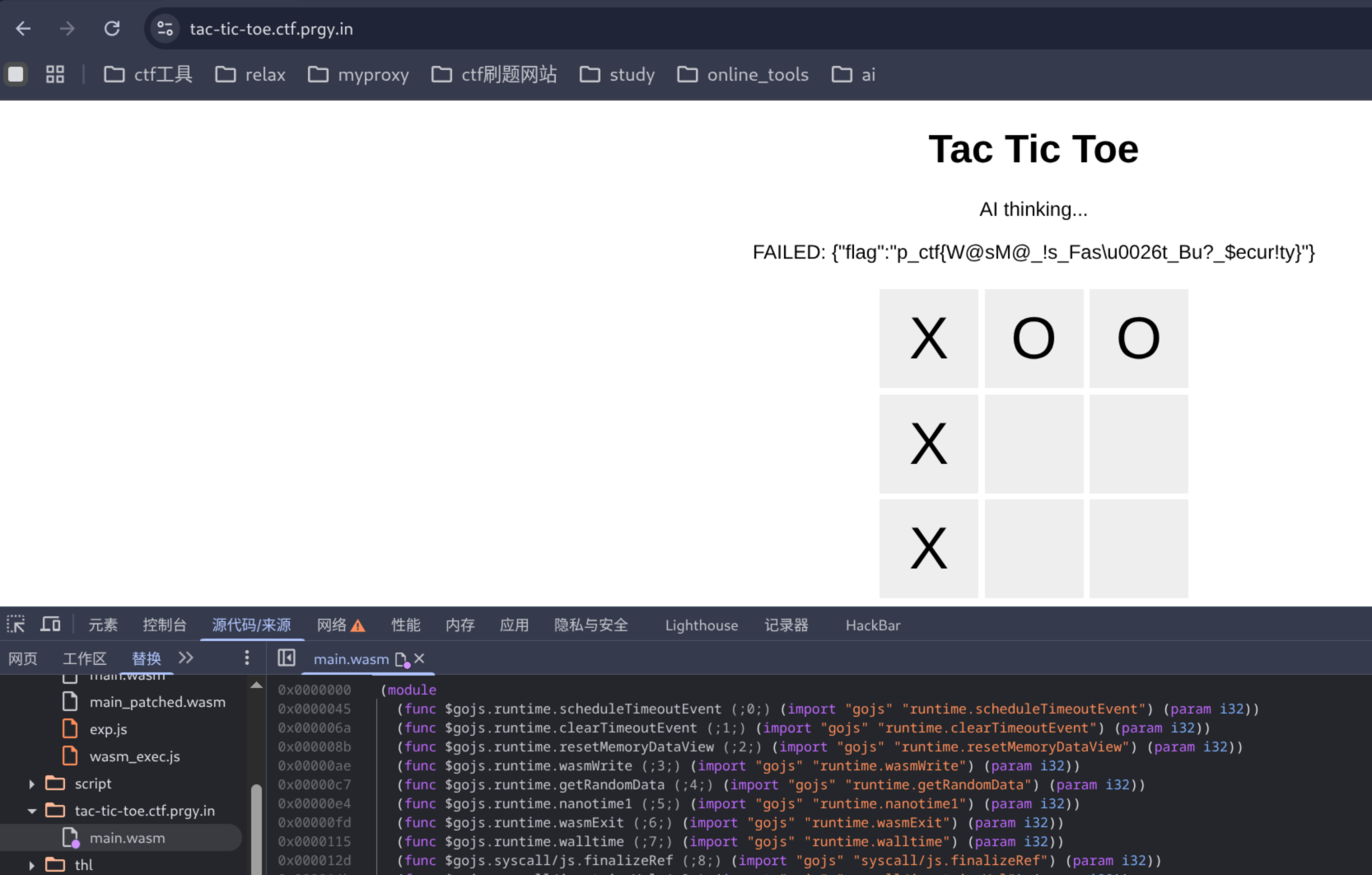
第二种是本地再写个 exp.js,直接本地打,一定要将对应文件拷贝过来
// solve_final.js
// 本脚本来自https://ctf.krauq.com/pragyanctf-2026#tac-tic-toe的题解
const fs = require("fs");
require("./wasm_exec.js");

async function main() {
  const startRes = await fetch("https://tac-tic-toe.ctf.prgy.in/start");
  const startData = await startRes.json();

  const go = new Go();
  const wasmBuffer = fs.readFileSync("./main_patched.wasm");
  const result = await WebAssembly.instantiate(wasmBuffer, go.importObject);
  go.run(result.instance);

  InitGame(startData.proof_seed);

  for (const m of [0, 3, 6]) {
    if (globalThis.gameStatus !== "playing") break;
    PlayerMove(m);
  }

  const data = GetWinData();
  const payload = {
    session_id: startData.session_id,
    final_board: data.moves,
    proof: data.proof
  };

  const res = await fetch("https://tac-tic-toe.ctf.prgy.in/win", {
    method: "POST",
    headers: { "Content-Type": "application/json" },
    body: JSON.stringify(payload)
  });
  console.log(await res.text());
}

main();
一共三个文件,见下面
➜  exp ls -la
总计 1760
drwxrwxr-x  2 yolo yolo    4096  2月10日 00:57 .
drwxr-xr-x 15 yolo yolo    4096  2月 9日 22:38 ..
-rw-rw-r--  1 yolo yolo     911  2月 9日 23:27 exp.js
-rw-rw-r--  1 yolo yolo 1768845  2月 9日 23:28 main_patched.wasm
-rw-------  1 yolo yolo   17041  2月 9日 22:39 wasm_exec.js
➜  exp node exp.js
{"flag":"p_ctf{W@sM@_!s_Fas\u0026t_Bu?_$ecur!ty}"}
方法二
这方法二是我自己想到的,大概率是非预期了
回到 wat 文件分析getWinData函数,差不多在 522644 行,可以结合那个 app.js 看,会发现那个函数的主要逻辑是验证走法以及对应的 seed
const data = GetWinData();  // 调用 WASM 中的 getWinData
const payload = {
    session_id: sessionId,
    final_board: data.moves,   // 走法记录
    proof: data.proof          // 关键!证明数据
};
这里存在 WASM 架构特性:线性内存共享,既然是本地运行那个 wasm 文件,那么动态调试,更改内存的值完全可行,那就稳了,我们只要找到表格对应的数组,就能强行在上面覆盖了
JS 有权限读内存的,可以直接用new BigUint64Array(wasmInstance.exports.mem.buffer)创建后门视图
可以直接查看 app.js,会发现玩家的叉代表数字是 1,ai 的圈代表的数字是 0
这里先走了表格中第 5 个格子(索引是 4),全局搜索值是 1 的结果就是 addr,然后 addr 对应的其实是一整个表格的地址,因此完整地址为 addr~addr+8
接下来就轻松了,覆盖 6,7,8,其他都变成 0 空着就可以了
(async () => {
    const mem = new BigUint64Array(wasmInstance.exports.mem.buffer);
    PlayerMove(4);
    await new Promise(r => setTimeout(r, 50));
    const addr = mem.findIndex(v => v === 1n); //用来查找1的
    if (addr === -1) return;
    const targets = [6, 7, 8];
    for (let i = 0; i < targets.length; i++) {
        PlayerMove(targets[i]);
        await new Promise(r => setTimeout(r, 50));
        for (let j = 0; j < 9; j++) {
            if (j === 4 || targets.slice(0, i + 1).includes(j)) {
                mem[addr + j] = 1n;
            } else {
                mem[addr + j] = 0n;
            }
        }
    }
    window.gameStatus = "win";
    submitWin();
})();
喜欢的话,留下你的评论吧~